 Folio Launcher
Folio keeps crashing
If Folio closes twice right after starting, it opens in Safe Mode with the optional features paused, so the phone is usable while you work out which one it was.
Safe Mode
Safe Mode pauses the optional features and leaves everything else alone. In the app's own words, your settings are never changed: nothing is deleted, and your layout is where you left it.
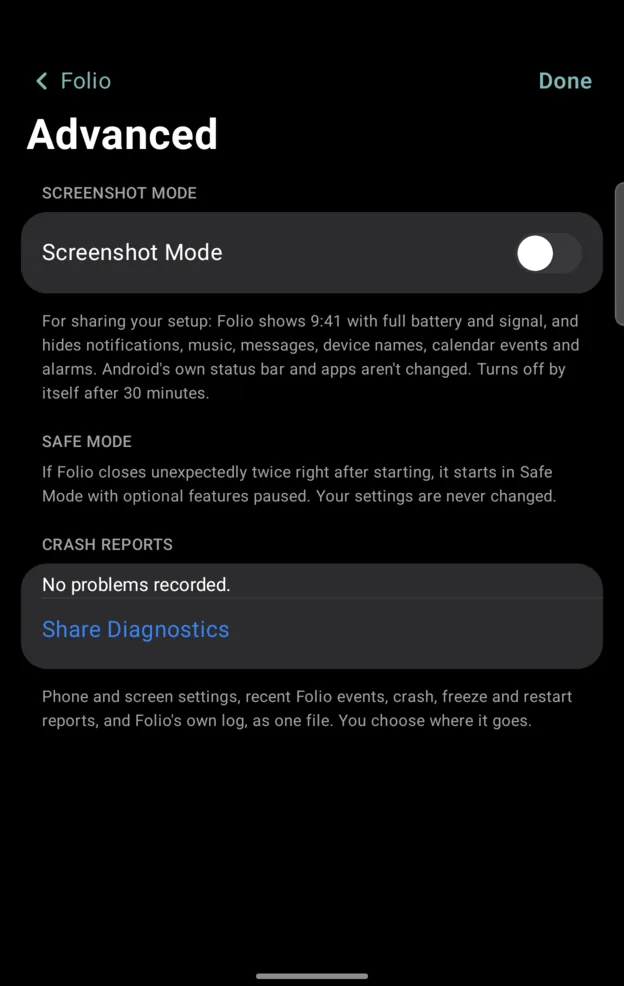
- Open Folio Settings › General › Advanced. Searching Settings for Safe Mode goes straight there.
- Read what happened. The report names what was running.
- Turn off whatever you changed last, most often the tweak you added just before it started.
- Leave Safe Mode and carry on.
The crash report
Crash reports stay on the phone, and the same page says so: No problems recorded when there is nothing to see. Nothing is sent anywhere unless you tap Share Diagnostics and choose where it goes. That file holds your phone and screen settings, recent Folio events, crash, freeze and restart reports, and Folio's own log.
Reporting it
Include these, because without them a crash is usually not reproducible:
- The Folio version, from Help › What's New.
- Your phone and its Android version.
- Whether it was folded or unfolded.
- What you did immediately before it happened.
Issues are on GitHub, and a report with those four lines usually gets fixed.
Before you send a screenshot
Look at it first. A home screen screenshot shows your apps, your widgets and anything in a notification, and a crash report can carry account names. It is your call what goes in a public issue.
Screenshot Mode, on the same Advanced page, is built for this: Folio shows 9:41 with full battery and signal, and hides notifications, music, messages, device names, calendar events and alarms. It turns itself off after 30 minutes. Every screenshot on this site was taken with it on.
Written for Folio 0.6.8. If something here is wrong, out of date or missing,open an issue and it gets fixed.