 Folio Launcher
Widgets that will not add, move or resize
Most widget trouble is Android's rules rather than Folio's, which is also why the fix is usually somewhere you would not think to look.
Add one
- Long press an empty spot and tap Add Widget, or tap + while editing Home.
- Pick the widget. Android asks for permission the first time you add one from another app.
- If it lands saying Finish setup, tap that and the app takes over.
Folio hosts ordinary Android widgets and its own iOS-style ones: Smart Stacks, Suggestions, Up Next and the rest. The iOS-style ones need nothing from another app.
It will not move or resize
Hold still until the widget lifts, then drag. On a widget that scrolls, a calendar list for instance, moving too early scrolls the widget instead of picking it up.
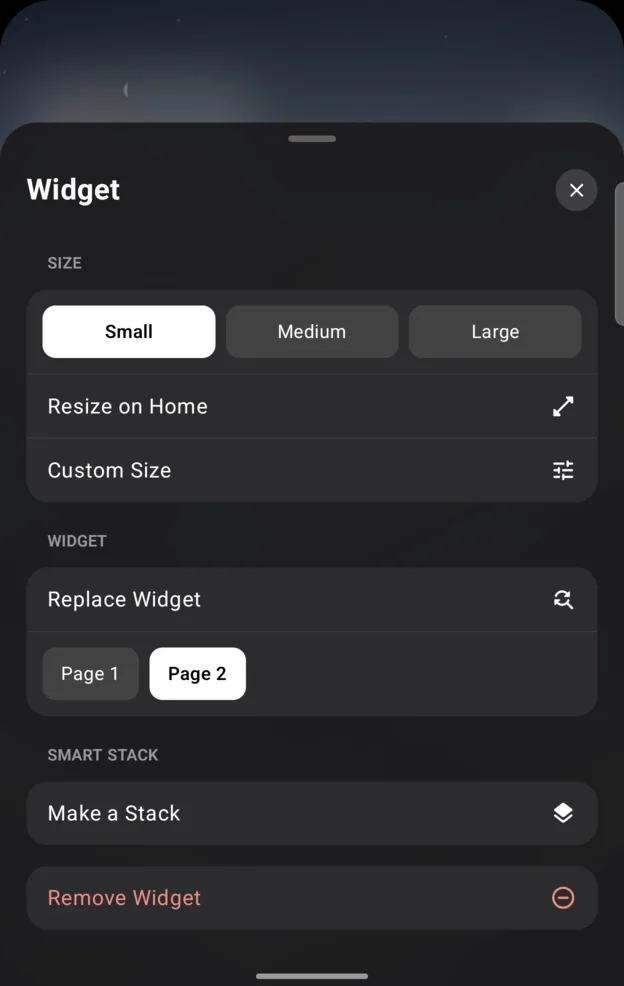
To resize, long press and let go for the widget sheet. Small, Medium andLarge are the iOS sizes; Resize on Home drags the corners yourself, andCustom Size types the numbers. The same sheet moves the widget to another page, swaps it withReplace Widget, or turns it into a Smart Stack with Make a Stack.
A red outline
That size will not work: it overlaps something, runs off the page, or is past the largest or smallest size the widget itself allows. Folio cannot override the sizes a widget declares.
What the labels on a widget mean
Finish setup
The app has more to ask you. Tap it to carry on, or cancel to remove the placeholder.
Reconnect
You have restored a backup, and this widget needs permission again. Tap it and approve Android's prompt. If the app is not installed any more, use Replace.
Widget not added
Android turned the request down. Dismiss it and try again.
One thing not to do
Do not clear Folio's storage, or the widget app's data, to fix a widget. That breaks the connection between them for good, and the widget has to be added again from scratch.
The Today View is empty
Folio's own Today View works offline and should never be blank for long. Google Discover is a different thing: it needs the Google app, and whether it works at all depends on your phone. If a recovery card appears, tapRetry or Open Google, and leave with Back to Home.
Written for Folio 0.6.7. If something here is wrong, out of date or missing,open an issue and it gets fixed.