 Folio Launcher
App Library
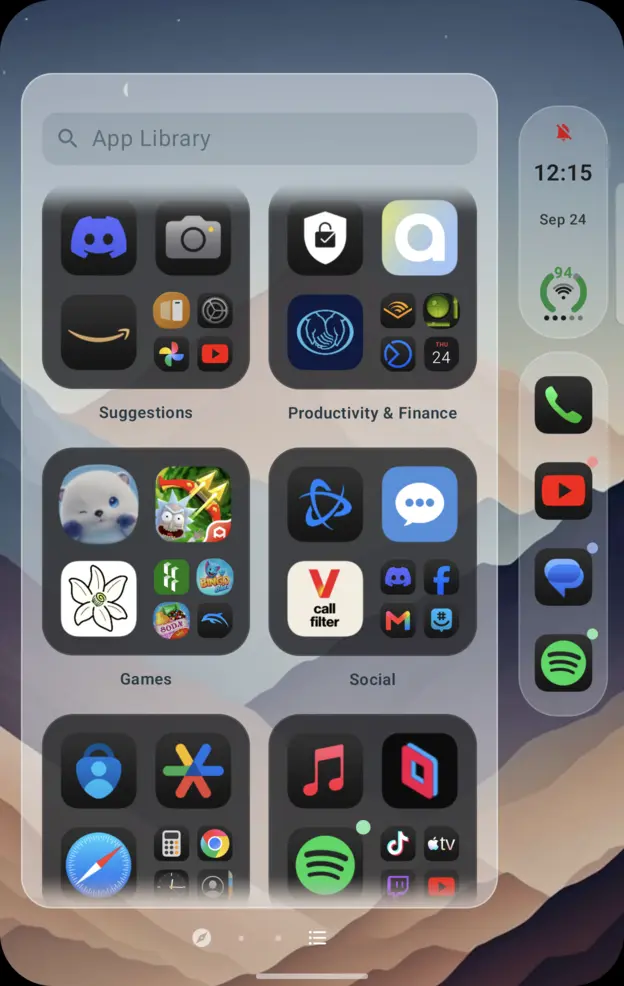
Everything you have installed, grouped for you, one swipe past the last page.
How you use it
- Swipe past your last home page, or tap the App Library button beside the search row.
- Groups are worked out for you: Suggestions, Productivity, Games, Social and the rest.
- Search at the top finds anything, including apps you never put on Home.
What is different here
Home can be as small as you like
Apps live in the Library whether or not they are on a page, so you can keep one page and still reach everything.
A group opens into the group
Tapping the cluster opens that group rather than throwing every app at you in a grid.
It uses the room it has
Unfolded, the Library lays out for the bigger screen instead of a phone column in the middle.
The rest of it
Dynamic Island · Control Center · Spotlight
Try it on your phone
5.1 MB, Android 12 and up. Free and open source, no ads, no account.